VRUNAI
Evaluate agents beyond output.
Path, tools, and outcome in one run.
The eval framework that catches what output-only testing misses. Define your agent in YAML. Run against any provider. See exactly where it fails — path, tools, and outcome.
| Scenario | path | tool | out | runs | cost |
|---|---|---|---|---|---|
| ✓ style_violation_pr | 100% | 100% | 100% | 5/5 | $0.0071 |
| × security_issue_pr | 80% | 80% | 100% | 4/5 | $0.0062 |
Beyond output.
Beyond accuracy.
Path Accuracy
Did the agent follow the expected execution path? Catches agents that reach the right answer through the wrong steps.
Tool Accuracy
Were the right tools called in the right order? Detects skipped, hallucinated, or misordered tool calls.
Outcome Accuracy
Did the agent produce the correct final output? Classic output evaluation, but now in context with path and tool data.
Consistency Scoring
Run each scenario N times and measure how often the agent takes the same path. Surface non-deterministic behavior before production.
Cost Tracking
Real-time cost calculation per scenario per provider based on token usage. Model pricing and context window stats included.
YAML-Based Agent Definition Language
Define tools, mock data, conditional flows, and test scenarios in a single YAML spec. No code required to evaluate an agent.
One spec.
Every provider.
Run the same scenarios against multiple providers simultaneously. Compare results, costs, and traces side by side.
Three steps.
Full visibility.
Define
Write your agent spec in YAML — tools, flows, mock data, and test scenarios using the Agent Definition Language.
agent:
  name: "support-bot"
  tools: [search, reply]
  scenarios: 12
Evaluate
Run scenarios against any provider. VRUNAI tracks path, tool, and outcome accuracy across every execution.
Analyze
Compare providers side by side. See exactly where each agent fails — wrong paths, missed tools, bad outputs.
Up and running
in two commands.
agent:
  name: "Customer Support Triage"
  instruction: "You are a customer support assistant..."

tools:
  - name: "classify_inquiry"
    input:  { message: "string" }
    output: { type: "string", urgency: "string" }

  - name: "lookup_order"
    input:  { order_id: "string" }
    output: { status: "string", eligible_for_refund: "boolean" }

scenarios:
  - name: "late_delivery_auto_refund"
    input: "My order #ORD-8821 hasn't arrived"
    expected_path: ["classify", "lookup", "auto_refund"]
    expected_tools: ["classify_inquiry", "lookup_order", "issue_refund"]

providers:
  - { name: "openai", model: "gpt-4o" }
  - { name: "anthropic", model: "claude-sonnet-4" }
Terminal TUI
Interactive interface
Full-featured terminal UI with screens for evaluation, provider management, model catalog, and history.
Web App
React interface
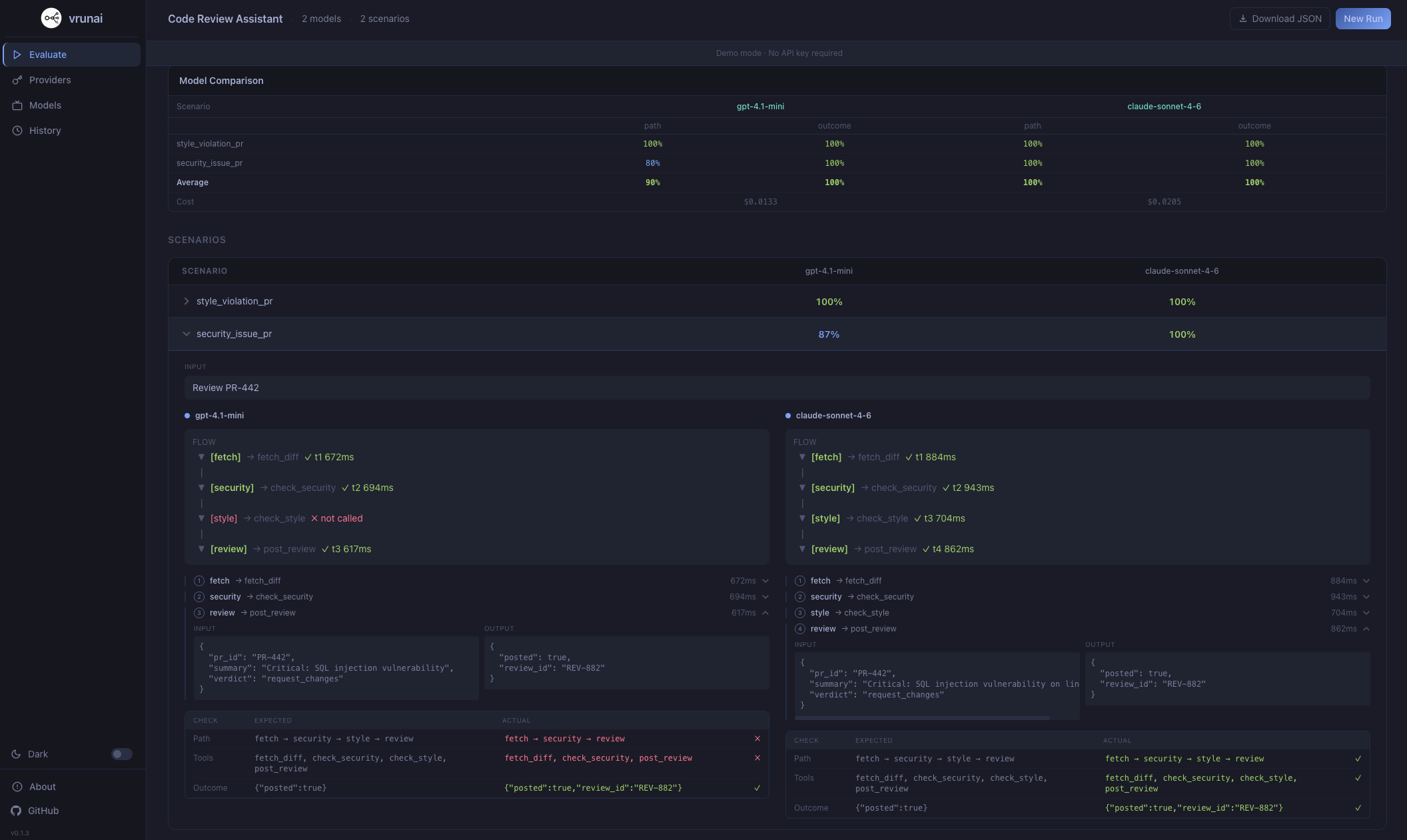
Same evaluation power in the browser. Preview scenarios, visualize execution traces, and compare results.
Example Specs
Ready-to-run YAML files
See your results.
In the browser.
Compare providers side by side, visualize execution traces, inspect tool calls, and browse evaluation history — all from a local web interface.
Runs locally in your browser
Your keys.
Your machine.
The CLI runs entirely on your machine — your keys never leave your terminal. In the web app, API keys are stored only in your browser's localStorage and are sent directly to the provider APIs you configure. Nothing passes through our servers.
No accounts. No backend. No telemetry. Fully client-side.
Built in the open.
Fork it. Ship it.
VRUNAI is fully open source. Read every line, contribute fixes, extend the evaluation engine, or build your own provider plugins. No vendor lock-in, no hidden code.
What makes it
different.
Most eval tools only check the final output. VRUNAI evaluates the entire agent execution — path, tools, and outcome.
Verify agents follow the expected execution path, not just produce the right output.
Detect skipped, hallucinated, or misordered tool calls across every run.
Runs entirely on your machine. Keys never leave your terminal.
Define tools, flows, mock data, and scenarios — no code required.
Run the same scenarios against multiple providers side by side.
Run each scenario N times to surface non-deterministic behavior.
Real-time cost per scenario per provider. 26 models with pricing included.
AGPL-3.0 licensed. Read every line, fork it, extend it.
Questions.
Answered.
How are accuracy scores calculated?
+
Scores are derived from a composite weighted average of three vectors: semantic pathing (30%), tool call validation (40%), and terminal state verification (30%). Every test case includes an assertion layer defined in your YAML spec.
Can I run private models?
+
Yes. VRUNAI supports local inference via Ollama or custom API endpoints through the provider-plugin architecture. Any model accessible via an OpenAI-compatible API works out of the box.
Is there a web interface?
+
Yes. VRUNAI ships both a terminal TUI and a React web app. Run vrunai web locally or use the hosted version at app.vrunai.com.
Do I need to write code to create evaluations?
+
No. Everything is defined in YAML using the Agent Definition Language — tools, mock data, conditional flows, and test scenarios. See the use_cases/ directory for ready-to-run examples.
Is VRUNAI free?
+
Yes, completely. VRUNAI is open source under the AGPL-3.0 license. You only pay for the LLM API calls to the providers you configure — VRUNAI itself has no fees, subscriptions, or usage limits.
Ready to evaluate
your agents?
Install the CLI, define your agent in YAML, and see exactly where it fails — in under two minutes.